
Discuss the objectives of computer networks and provide examples of how they facilitate resource sharing and data communication.
The primary objective of computer networks is to enable resource sharing, data communication, and collaboration.
1. Resource Sharing
Computer networks allow devices to share resources such as printers and storage, reducing the need of multiple printers, cutting costs and improving efficiency.
2. Data Communication
Network enables data transfer, communication through emails, instant messaging, video conferencing.
Example: Employees in different locations can collaborate through video conferencing tools like Zoom or Microsoft Teams.
3. Connectivity and Collaboration
Networks connect devices, allowing for productivity and flexibility.
Example: A team can work on a shared document in real time using cloud-based services like Google Drive.
In Simplex communication system, assume data is transmitted at a rate of 500 bits per second bps. Compute the time to transmit a message if:
- It’s 10 kilobits
- It’s of 10 kilobytes
Note: Time (seconds) = Data Rate (bps) ÷ Message Size (bits)
(a) it is of 10 Kilobits
Ans: 1 Kilobit = 10³ bits, so 10 Kilobits = 10 × 10³ = 10,000 bits
Time = 10,000 bits ÷ 500 bps = 20 seconds
(b) it is of 10 Kilobytes
Ans: 1 Kilobyte = 10³ bytes (since 1 byte = 8 bits)
10 KB = 10 × 10³ × 8 = 80,000 bits
Time = 80,000 bits ÷ 500 bps = 160 seconds
Describe how data is transmitted across computer networks using packet switching and circuit switching.
Networking devices include hubs, switches, routers, and access points are responsible for the management and direction of network traffic.
Switch
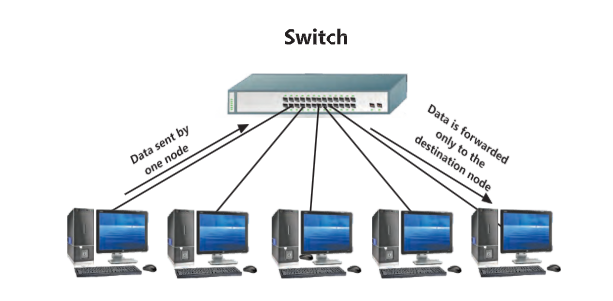
Switch is a network device that connects multiple network devices such as computers, printers, and servers, within a network and allows these devices to communicate with each other efficiently. Switches play an important role in modern networks by efficiently managing data traffic and ensuring that information reaches the correct device.
How Does a Switch Work?
A switch is used at the Data Link layer which is called the Layer 2of the OSI model (Section 6.6). It uses hardware address of a device called Media Access Control (MAC)addresses to forward data to the correct device. When a data packet reaches at the switch, it reads the destination MAC address and sends the packet only to the device with that address, rather than broadcasting it to all devices
Router
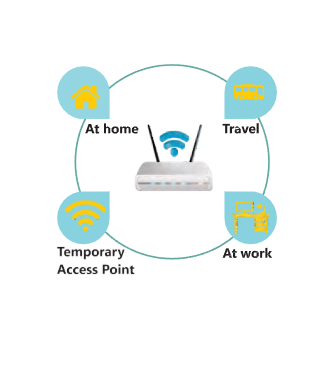
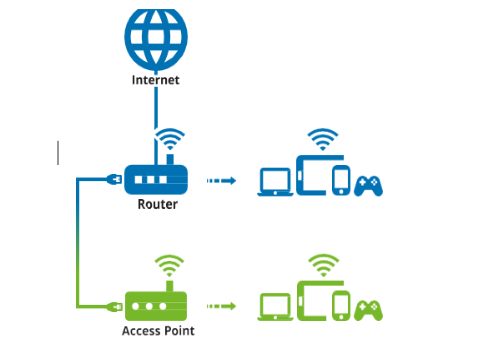
A router is a networking device that interconnects networks or allows devices to connect to it. It directs data packets between different networks. Think of it as a traffic director on the internet, making sure that data gets from one place to another efficiently. Figure 6.2 illustrates how a mobile internet connection (via SIM card) integrates with a home network. Alternatively, an Ethernet cable can be used to obtain internet access and distribute it among home devices. In enterprise environments, different types of routers.
How Does a Router Work?
Packets: Each packet contains part of the data and the address of the destination. The main job of router is to find the best path for each data packet to deliver its destination.
Access Point
An Access Point (AP) is a networking device that facilitates the connection of wireless devices to a wired network. It works as a link between your computers and smartphones or any other wireless device and the internet.How Does an Access Point Work? An Access Point works by receiving data from the wired network and transmitting it wirelessly to your devices. It also receives data from your wireless devices and sends it to the wired network.
Discuss the role and importance of protocols in Data Communications. Explain the functions of key protocols such as TCP/IP, HTTP, DNS and DHCP.
Protocols are the fundamental rules, standards and procedures that govern data flow across a network. They ensure that data is transferred smoothly, securely and accurately. Without protocols, devices with varying hardware , software and configurations would struggle to communicate properly. Common protocols include TCP/IP, HTTP, FTP, and SMTP.
Example: HyperText Transfer Protocol (HTTP) is used for transferring web pages over the internet.
Domain Name System (DNS)
DNS translates domain names to IP addresses, making it easier for users to access websites.
Example: When you type www.example.com in a browser, DNS translates it to the corresponding IP address.
Dynamic Host Configuration Protocol (DHCP)
DHCP automatically assigns IP addresses to devices on a network, simplifying network management.
Example: When a device connects to a Wi-Fi network, DHCP assigns it an IP address.
Evaluate different methods of network security, firewalls, encryption, and antivirus software.
Network security involves measures to protect data and prevent unauthorized access to computer networks. Let’s explore the importance of network security and some key concepts with examples.
Importance of Network Security:
Network security is important for several reasons:
- Data Protection: Ensuring that sensitive information is not accessed or altered by unauthorized users.
- Preventing Attacks: Defending against malicious attacks that can disrupt networks and steal data.
- Maintaining Privacy: Safeguarding personal and confidential information from being compromised
- Ensuring Availability: Ensuring that network resources are available and accessible to authorized users.
Key Concepts in Network Security:
Firewalls:
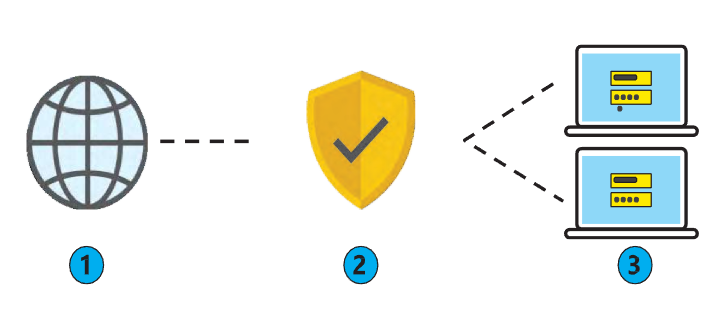
Firewalls are security systems that monitor and control incoming and outgoing network traffic based on predetermined security rules.
Encryption
Encryption transforms data into a secure format that can only be read or understood by authorized parties with the correct decryption key.
Decryption is the process of converting the encrypted data back to its original form.
Example:
Plain Text: Hello, World!
Encrypted Text (using a simple shift cipher): Khoor, Zruog! where each letter in the plaintext is replaced by the letter that is 3 positions down the alphabet.
Decryption: Converting “Khoor, Zruog!” back to “Hello, World!” using the same shift cipher in reverse.
Ciphertext Exchanged Between Countries
Countries often exchange sensitive information securely using encryption. The encrypted data, known as ciphertext, can only be read by the intended recipient who has the decryption key. This ensures national security and protects classified information from being intercepted and read by unauthorized parties.
Passwords and Authentication
Passwords and authentication methods ensure that only authorized users can access network resources.
Common Threats to Network Security
- Malware: Malicious software such as viruses, worms, and ransomware that can damage or steal data.
Phishing: Attempts to trick users into revealing sensitive information through deceptive emails or websites.
- Denial of Service (DoS) Attacks: Overwhelming a network with traffic to disrupt its normal operation and make it unavailable.
- Man-in-the-Middle Attacks: Intercepting communication between two parties to steal information or alter messages.
Describe real world applications of computer networks in business , education and healthcare.
Business
In business, networks enable efficient communication, resource sharing, and data management.
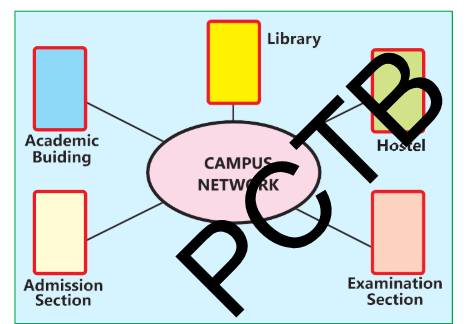
Example: Companies use intranets to share information and resources securely
within the organization.
Education
Educational institutions use networks to provide online learning platforms, virtual classrooms, and access to educational resources.
Example: Universities use Learning Management Systems (LMS) like Blackboard and Moodie to deliver course content and assessments.
Healthcare
Healthcare networks facilitate the sharing of patient information, telemedicine, and access to medical databases.
Example: Hospitals use Electronic Health Records (EHR) systems to store and retrieve patient data efficiently.
Compare and contrast the different types of network topologies (star, ring, bus and mesh)
Network topologies are methods used to define the arrangement of different devices in a computer network, where each device is called a node. The reliability and performance of a network are impacted by the way its devices are linked.
Bus Topology
In a Bus topology, all devices share a single communication line called a bus. Each device is connected to this central cable.
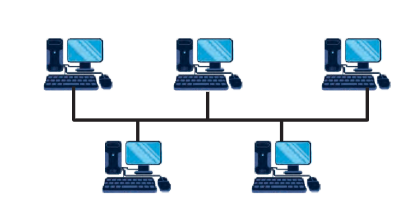
Example: Imagine a chalkboard in a classroom where every student can see the notes written by the teacher. Here, the chalkboard represents the shared communication line.
Star Topology
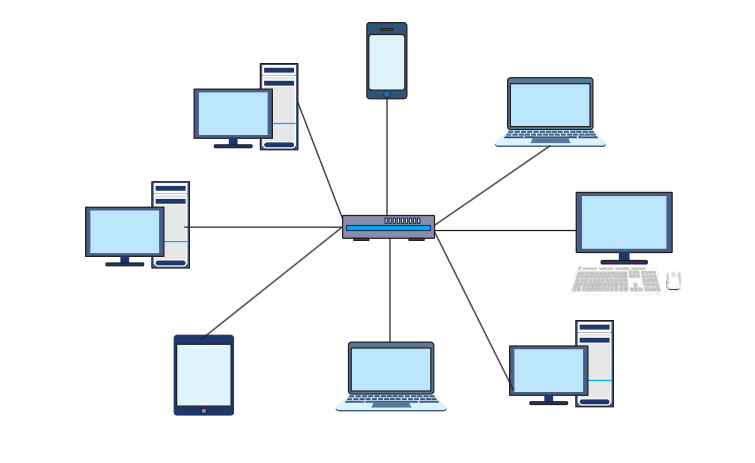
In a star topology each node in network communicates with the others via a central switch or hub. The hub works as a data flow repeater.
Example: Think of a school principal’s office connected to all classrooms through intercoms. The principal’s office is the hub, and the classrooms are the nodes.
Ring Topology
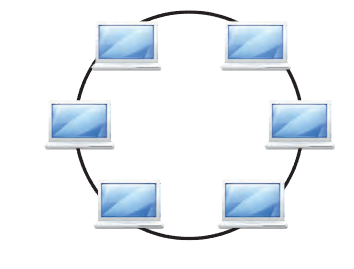
In a Ring topology, each device is connected in a circular pathway with other devices. Data travels in one direction, passing through each device.
Example: Consider a relay race where each runner passes the baton to the next runner in a circle until it reaches the starting point again.
Mesh Topology
In a Mesh topology, each device is connected to every other device. This provides high redundancy and reliability.
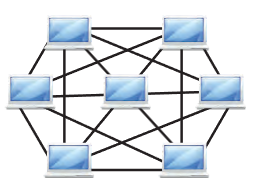
Example: Imagine a city where every house is directly connected to every other house by roads. If one road is blocked, there are multiple alternative routes.
Consider a shift cipher with a shift amount of 4.
- Encrypt the message “SECURITY”
The message is “SECURITY” . Encrypt the message each letter by shifting 4 positions forward:
Encrypted message:
“WIGYVMXC”
| Letter | Shifted by 4 | Result |
| S | W | W |
| E | I | I |
| C | G | G |
| U | Y | Y |
| R | V | V |
| I | M | M |
| T | X | X |
| Y | C | C |
- Decrypt the message “WMXYVMI”
The message is “WMXYVMI”. Decrypt the message by shifting 4 positions backward.
Decrypted message: “SITURIE”
| Letter | Shifted by 4 | Result |
| W | S | S |
| M | I | I |
| X | T | T |
| Y | U | U |
| V | R | R |
| M | I | I |
| I | E | E |
An IPv4 address is a 32-bit number. Calculate the total number of unique IPv4 addresses possible.
(a) Show the calculation for the total number of IPv4 addresses.
Ans. The total number of unique IPv4 addresses can be calculated as:
Total unique IPv4 addresses = 2³²
= 4,294,967,296
(b) How many addresses are left if 10% of the total addresses are reserved for special purposes?
Ans. If 10% of the total IPv4 addresses are reserved for special purposes, then 90% of the addresses are available for use.
Reserved Addresses = 10% × 4,294,967,296
= 0.1 × 4,294,967,296
= 429,496,729.6
The number of reserved addresses is approximately 429,496,730.
The remaining addresses are:
4,294,967,296 − 429,496,730 = 3,865,470,566