
Unit no 08: Web Development with HTML, CSS and JavaScript
Short Answer Questions:
- What is the purpose of the <head> tag in HTML?
<head>: This section contains meta information about the HTML document like the title.
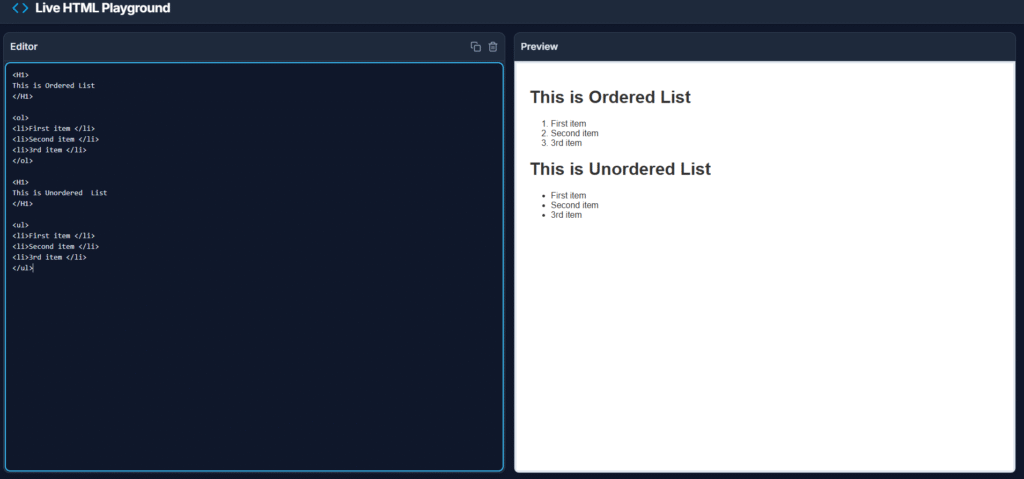
- Explain the difference between an ordered list and an unordered list in HTML.
How do you add a comment in CSS?
To add comments in CSS, follow the following method:
HTML comments begin with <! —- and end with —- >. Any text placed within these markers will be treated as a comment and will not be rendered by the browser.
Example: <! This is a Comment >
- What are the different ways to apply CSS to an HTML document?
Applying CSS can be three primary ways:
- Inline styles
- Internal styles
- External styles
- How can you include JavaScript in an HTML file?
There are various ways to include JavaScript in an HTML file. One option is to use inline JavaScript, which embeds JavaScript directly into the event properties of an HTML element, such as onclick or onload.
- Describe the syntax for creating a hyperlink in HTML.
Anchor: The <a> </a> tag is known as anchor tag. It is use to create a hyperlink which may be text or image with the href attribute. The href attribute is used to specify the URL of the webpage.
Syntax:
< href = “url”> text to be displayed </a>
Example:
<a href=http://www.pakstudynotes.com> Visit best website for Computer Science notes </a>
- What is the function of the <div> tag in HTML?
HTML elements like <div> and <section> are used to group content together; you can then use CSS to style and position them.
For Example:
<div class=*container*>
<section class=*header* >This is the header </section>
<section class=*footer*>This is the footer </section>
</div>
- How do you link an external CSS file to an HTML document?
The most efficient method for larger project is to use an external CSS file which is linked to the HTML document with the <link> tag in the <head> section. That keeps HTML clean and allows for easy updates across multiple pages.
- What is the use of the <table> tag in HTML?
Tables in HTML are used to display data in a structured format, allowing for easy comparison and organization of information. A table is created using the <table> tag, which contains rows defined by <tr> (table row) tags, and each row consists of cells represented by <td> (table data) tags. Additionally, headings for the table can be added using <th> (table header) tags to provide context for the data.
- Explain the box model in CSS.
The CSS box model is used to design that outlines how contents on a webpage are organized and their sizes are determined. Every HTML element can be thought of as a rectangular box, with the box model defining the space around its content.